
Free creator resource
AI for Ministry: Eight Practical Prompts
Direct Answer Start with Scripture and your approved source material. Use these eight prompts to plan studies, discussion questions, Shorts, and accessible content, then check every claim before publishing.

Use today
Bring your message. Build a thoughtful workflow.
Choose a prompt below, replace the bracketed instructions with a Bible passage and your own approved notes, and review the result. Keep the named Bible translation with every exact quotation. These prompts work across general AI chat tools.
Download the free prompt pack (PDF)01 · Build a Scripture-centered outline
Using only the passage and source notes below, draft a 15-minute Bible study outline with a direct answer, historical and literary context, three teaching points, and one practical response. Give verse references for every Biblical claim. Separate what the text states from interpretation. Flag anything that needs checking. Source material: [paste passage, translation, and approved notes].
02 · Lead a small-group conversation
From the supplied passage, write six open questions that move from observation to interpretation to application. Include a facilitator note with verse references. Avoid leading questions and invented background details. Passage and approved notes: [paste sources].
03 · Plan a one-verse Short
Draft a 30-second spoken script around the supplied verse in context. Begin with a real question, give one clear explanation, and end with one practical action and a relevant study-page invitation. Mark any exact quotation and its translation. Do not promise outcomes. Source passage and study URL: [paste sources].
04 · Create original companion questions
Using these author-approved public book notes and Bible passages, create five original reflection questions and a one-week reading plan. Do not invent quotations or summarize chapters you have not received. Keep the Scripture passage central. Public notes and passages: [paste sources].
05 · Explore thumbnail ideas
Suggest six clear thumbnail concepts for this teaching. Use two to four readable words per concept. Make each match the actual message without sensational claims. Describe a simple image and strong mobile contrast. Approved teaching summary: [paste summary].
06 · Write useful page metadata
From this finished article, draft a clear title, a concise description, a direct-answer introduction, and three genuinely answered FAQs. Preserve the author's meaning and accurate references. Do not add keyword lists or claims of guaranteed rankings. Article: [paste approved article].
07 · Repurpose one approved teaching
Turn this approved teaching into a seven-day content plan with one short Scripture reflection, one discussion question, and one specific page link each day. Preserve context, vary the format, and mark every item for human review before publication. Teaching and relevant URLs: [paste sources].
08 · Describe artwork accessibly
Write concise alt text for the supplied image and page context. Describe visible elements and their purpose. Identify a Biblical scene as an illustration when appropriate. Do not invent identities, events, or text that is not visible. Image and page context: [attach image and describe purpose].
Before you publish
- Read the whole Bible passage and check each reference.
- Distinguish the text’s words from your interpretation.
- Verify quotations, historical details, and links.
- Use material you have permission to share and keep private prayer requests private.
- Let a responsible human approve the final teaching.
For a Short, invite viewers to a related video or your channel profile. YouTube does not make URLs in Shorts descriptions or comments clickable; link options depend on the surface and account features.
Learn more from YouTube’s guide to sharing links. For your website, focus on helpful answers, clear navigation, and accurate content, as described in Google’s guidance for AI features.
Invite Vince to teach AI & YouTubeLive online every Saturday
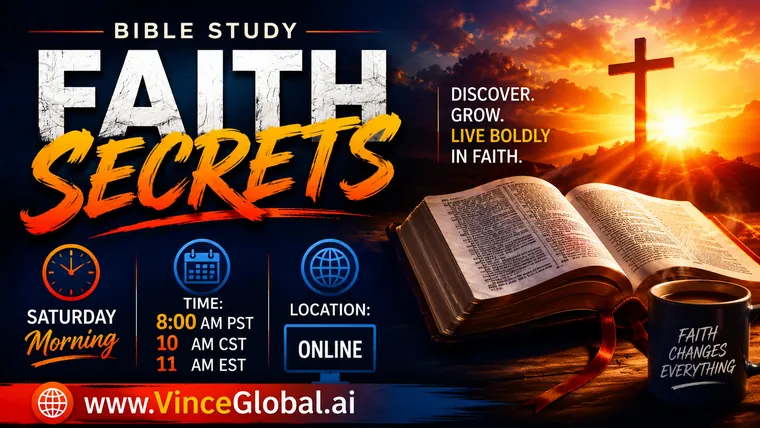
Bring your Bible on Saturday
In this interactive online Bible Study, Vince explores the words, miracles, and prophecies of Christ, what He accomplished on the cross, and how it all applies to your life. Come ready to grow in faith and have the eyes of your understanding opened.
Weekly Start Times
- 8 AMPacific
- 10 AMCentral
- 11 AMEastern
Next Online Bible Study Starts In
Your local start time
Get Saturday Bible Study Reminders
We’ll email you Friday at 5 PM and Saturday at 7:45 AM Pacific. Confirm your email to subscribe.
Open the Bible Study reminder signup form
Unsubscribe anytime.
From Vince’s bookshelf
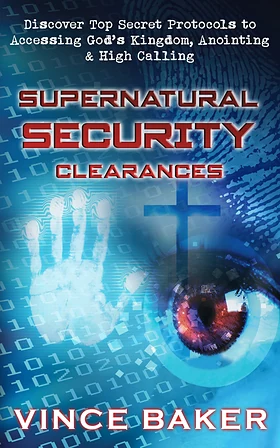
Supernatural Security Clearances
Vince Baker uses the idea of a security clearance to explore spiritual calling, preparation, and stewardship in God’s kingdom.
“Well, the title alone got my attention as I am working on strengthening and deepening my own relationship to God. I found this book to be very eye opening, and I will be…” — Beth Robins, reader review

Quote of the Day
“The faith of Jesus alone could get the job done, but He still required others to have faith.”
Vince Baker Read this quote →
Questions & answers
Frequently asked questions
Can AI replace Bible study or spiritual discernment?
Use it to organize supplied material and explore draft ideas. Read the passage yourself, verify the output, and keep responsibility for the final teaching.
Do I need a paid AI account?
The prompts are provider-neutral text you can adapt in a chat tool you already use. Features and account limits vary.
Can I invite Vince to teach a group?
Use the contact form, choose Speak at an Event or Invite Me to Speak at Your Church, and describe your audience and goals.